
Get your phones ready for adventure at Halcy-Con-3 – and your first Comms messages are waiting!
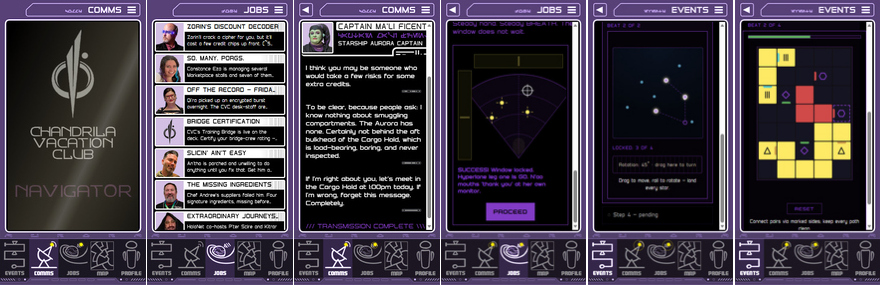
The CVC NAVIGATOR (aka “Nav”) makes the whole Halcy-Con 3 immersive fan event richer: it carries character messages, your schedule, your Faction missions, item inventory and even unlockable achievements — and it’s built to keep working even when the venue’s WiFi signal doesn’t.
The story doesn’t wait for October, either: your first transmissions are already waiting. They unlock the moment your phone passes the PreFlight
Check, and more arrive as the voyage approaches.
To make that work, it needs five minutes from you BEFORE you arrive.
On the phone you’re bringing to the event:
1. The PreFlight approach path differs by device type.
- iPhone: this first step MUST be completed in Safari, iPhone’s native browser, no other browser can do what Safari does here. COPY this address – https://halcy-con.com/nav/ – and paste or type it into Safari yourself. Don’t just tap it: a tapped link can open in the wrong browser, and only Safari can set your phone up. Not sure where Safari is? Swipe down on the middle of your Home Screen and type Safari – it appears right under the search bar.
- Android: just tap https://halcy-con.com/nav/ and open it in Chrome or Samsung Internet. After a short startup screen you’ll see a panel reading COMMS BAND SEALED – that’s normal before the event. Tap Run the PreFlight Check → and it will check your phone automatically.A Preparing for offline… counter may run at the bottom of the screen – that’s the download working in the background. No need to wait for it.
2. Add it to your Home Screen
- iPhone: Share → View More → Add to Home Screen
- Android: tap Install on the “Keep the Nav with you” banner (no banner? click ⋮ → Install app).
- This is what lets your phone hold everything reliably. On iPhone, this step must be completed in Safari.
3. Close the browser tab and open the new CVC Nav icon, then tap Run the PreFlight Check → again.
4. You’re ready when you see the green THIS PHONE IS READY.
5. Now collect the reward: tap Continue to your Nav (or just reopen the icon). The COMMS BAND SEALED panel is gone, and you
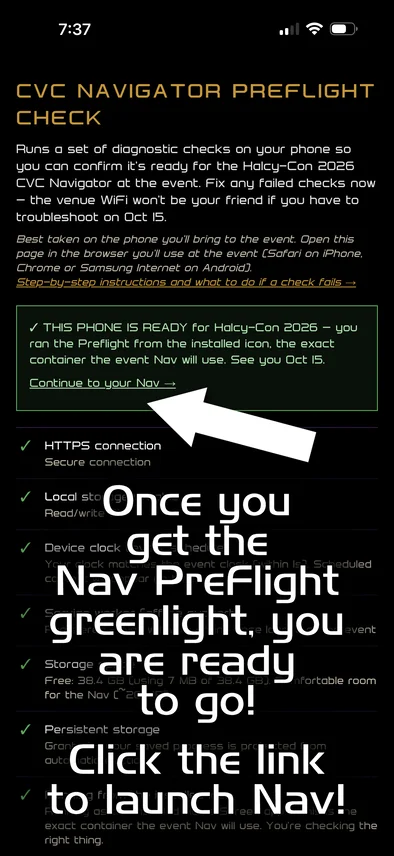
Amber “Almost there” isn’t a problem – it means you’re still in a browser tab. Open via the installed CVC Nav icon and it goes green.
Every check has a fix, and they’re all on the help page linked from the top of the check. If you get stuck, reply with what it showed and your phone model, and we’ll sort it out with you well before the doors open.
Please don’t leave this until you arrive. Several hundred people all downloading at once on the day of the event is exactly the situation this five minute PreFlight avoids.
Common questions are answered on the Halcy-Con 3 FAQ.
See you at the N’Orlando Port of Call Departure Terminal on October 15!